
On most mobile pentests, Frida is how you start poking at runtime behavior. Load the agent, hook the methods you care about, and see what the app does. On a recent engagement, that process didn’t last long. The app, protected by Mobile Protect from Data Theorem, eventually detected and enforced against the testing environment on both Android and iOS. Android did it almost immediately. iOS gave me a little more room to work, but not enough to avoid the same outcome.
What eventually did work was different on Android and iOS, but neither bypass required defeating the actual detection logic. The specific places this protection gave way are worth paying attention to for anyone making decisions about mobile runtime protection. This post walks through the path for both bypasses, including the failed attempts along the way.
How Mobile Runtime Protections Work
Mobile apps often have root and jailbreak detection to identify devices that have removed standard OS restrictions, and anti-tampering logic that tries to catch apps that have been repackaged, resigned, or instrumented at runtime. These checks often look for known binaries, filesystem artifacts, loaded libraries, suspicious processes, writable system paths, or instrumentation frameworks.
These controls are useful. They raise the cost of attack and catch unsophisticated attempts. But they run on a device the tester controls, which limits how much you can trust the result. A resilient design should assume that’s possible and limit what an attacker gains even after local checks are defeated.
Static Analysis on Android
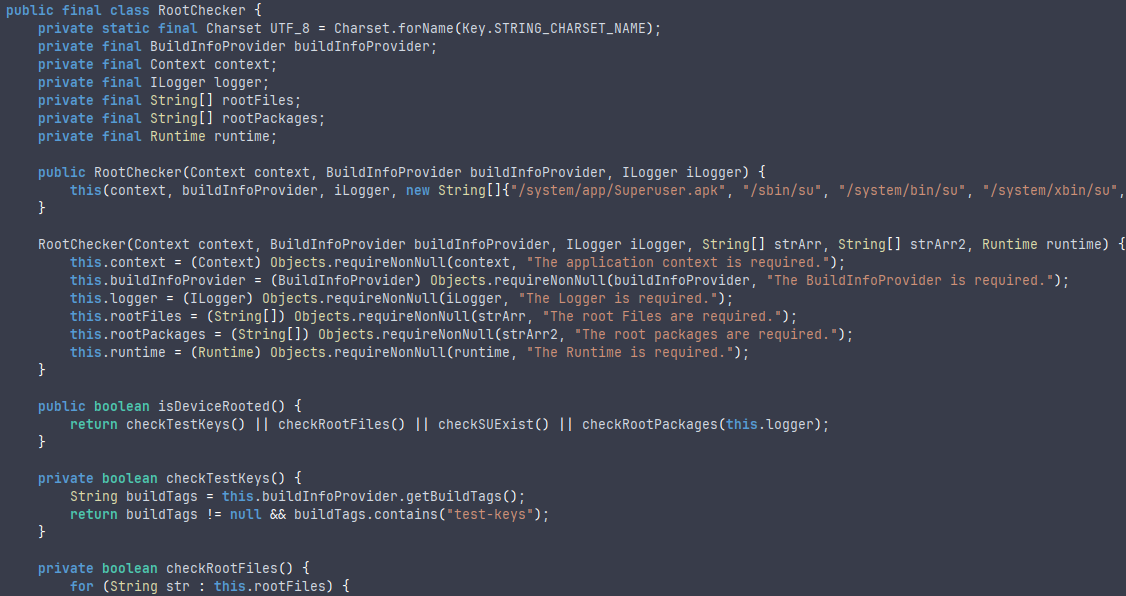
The Android assessment began with static analysis of the APK using JADX. Reviewing the decompiled code showed that the application integrated Mobile Protect functionality for root detection and anti-tampering enforcement. The detection approach appeared consistent with the common patterns described above.
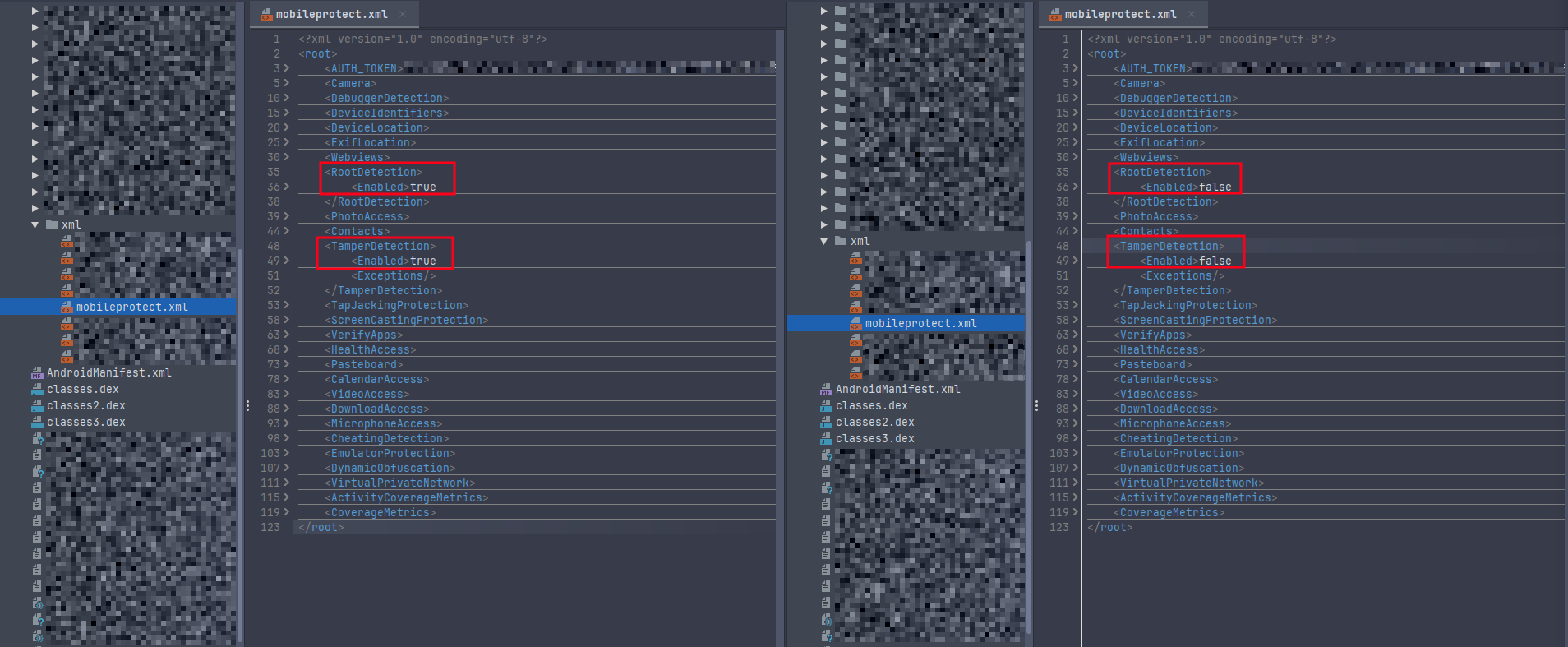
By searching for root detection related classes and methods, I was able to trace execution toward configuration-driven logic used by the Mobile Protect implementation. This eventually led to the discovery of a mobileprotect.xml configuration file packaged inside the APK.
Failed Bypass Attempts
The first bypass attempts used simple Frida hooks. This is a common starting point during mobile assessments because it allows testers to modify method behavior without changing the application package itself. However, this approach failed because the application checked for a loaded Frida agent during startup. Once instrumentation was detected, the protection logic terminated the application.
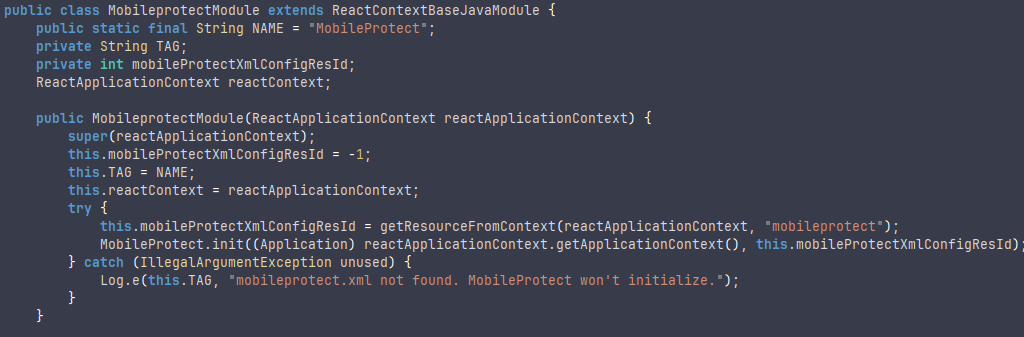
The next technique involved modifying the visibility of root-related applications using tools such as HideMyAppList, which prevent the target application from identifying root-related applications such as Magisk. This approach was also unsuccessful. Based on the observed behavior and static analysis, Mobile Protect was checking multiple detection categories during initialization, so hiding one wasn’t enough.
The Configuration File Bypass
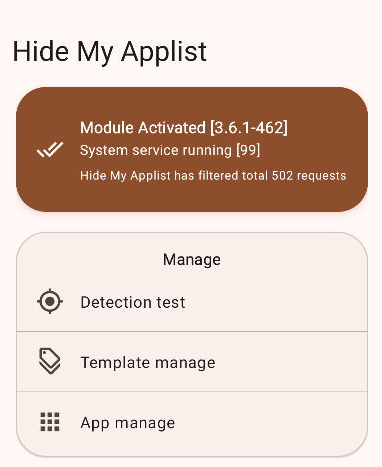
The most important discovery was the Mobile Protect configuration file, mobileprotect.xml. By tracing the root detection logic, I found that the configuration values were loaded at runtime through com.datatheorem.mobileprotect.MobileProtectConfig.
This shifted the strategy from purely a runtime bypass to package modification. If the protection behavior was controlled by configuration values bundled with the application, then modifying those values could change how Mobile Protect handled root detection and tamper enforcement.
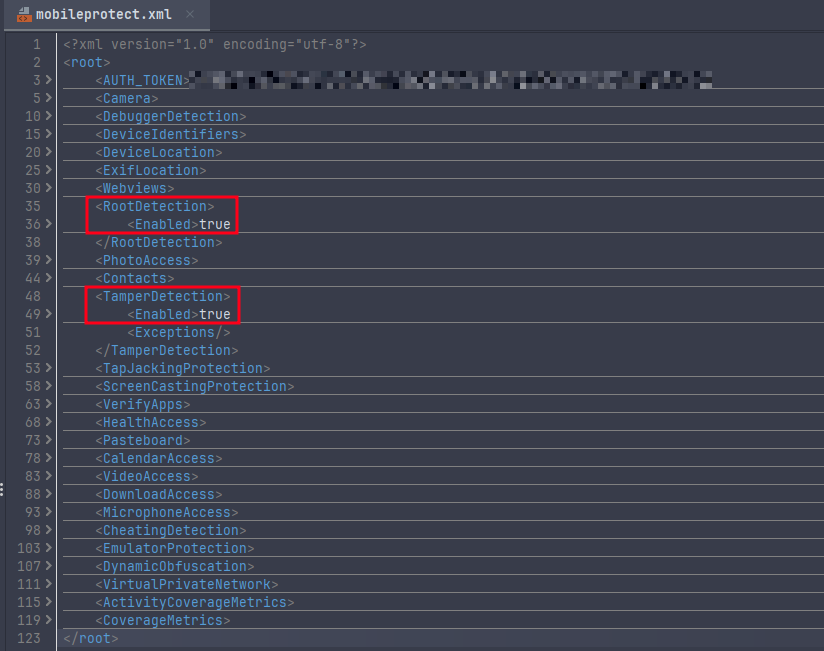
After identifying the configuration file, I unpacked the APK, modified the Mobile Protect configuration, and repacked and resigned the application for testing. Once installed, the modified application no longer enforced the same root and tamper detection behavior, and it ran successfully on the rooted device.
This was significant because the bypass did not require defeating every individual root detection check. Instead, the implementation was weakened by relying on client-side configuration that could be modified once the APK was unpacked.
Moving to iOS
The iOS implementation behaved differently than Android. Instead of immediately terminating, it appeared to run a longer scan, taking around 10 to 15 seconds before the enforcement terminated the application. Unlike the Android implementation, the iOS version did not appear to rely on a configuration file and instead used a configuration-in-code approach.
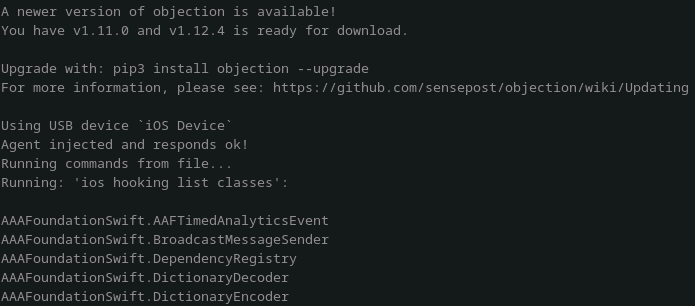
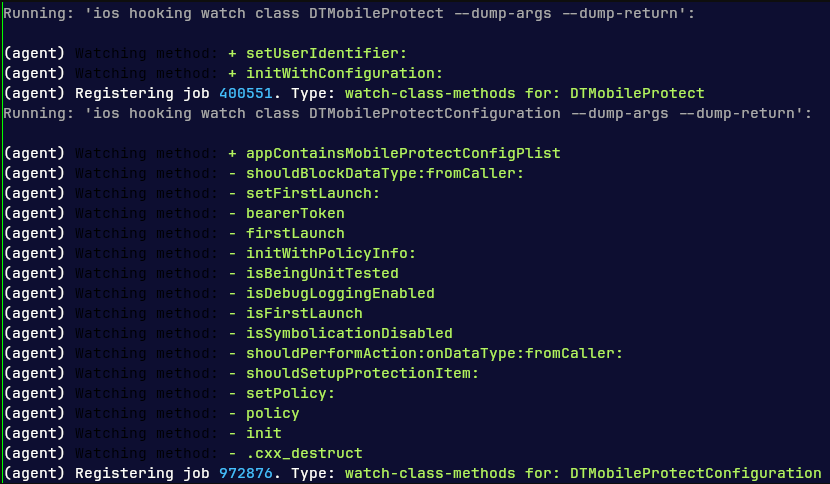
To better understand if, I used Objection to dump and enumerate classes, then searched the class list for names related to Mobile Protect. This narrowed the analysis from the entire application to a smaller set of relevant classes and methods. Once candidate classes were identified, I hooked them to observe method behavior and determine which methods influenced enforcement decisions.
Targeting the Enforcement Methods
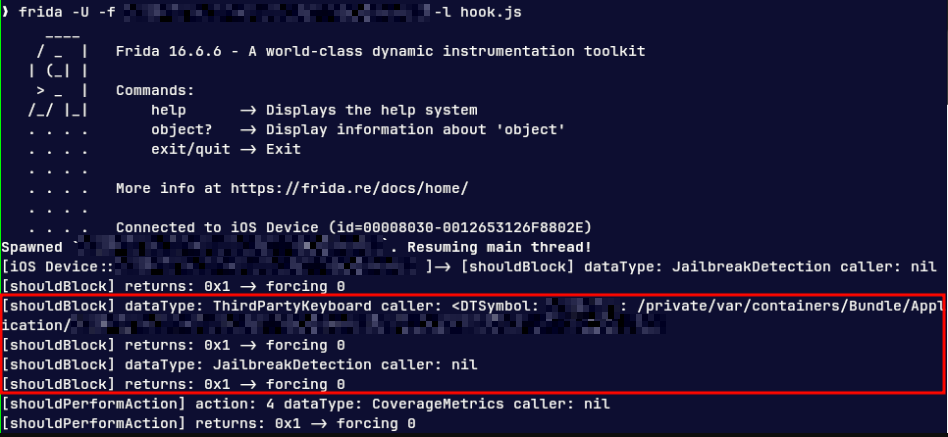
Through class enumeration and targeted method hooking, two methods stood out as especially relevant: shouldBlockDataType:fromCaller: and shouldPerformAction:onDataType:fromCaller:. These methods appeared to determine whether Mobile Protect should block access or perform an enforcement action based on a detected condition. During testing, return values of 0x1 (yes) indicated that an action should be performed or that a condition should be blocked. By observing and modifying these return values at runtime, I could determine which checks were triggering enforcement and which objects were being flagged by Mobile Protect.
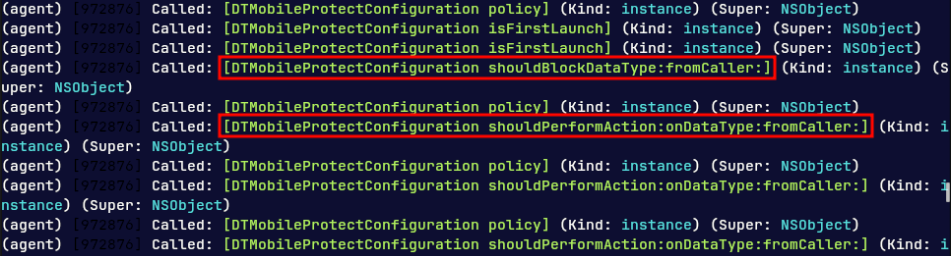
Once the enforcement methods were identified, the bypass became more straightforward. Instead of trying to hide every jailbreak artifact or defeat every individual detection check, I modified the enforcement decision itself. By forcing the relevant methods to return 0 (no), the application no longer treated the detection conditions as requiring enforcement, allowing it to continue running on the jailbroken device.
Lessons and Recommendations
Detection Relies on Many Signals
Root and jailbreak detection typically combines checks across files, processes, libraries, environment state, and instrumentation indicators. Hiding a single artifact, like a package or binary, probably isn’t going to work if the framework is looking at five other things at the same time.
For defenders, redundancy is the right design. It’s harder to defeat five checks than one. But it also pushes attackers past the individual checks and toward the logic that combines them, which is where both bypasses eventually ended up.
Client-Side Configuration Is a Weak Point
On Android, the protection behavior was driven by `mobileprotect.xml`, a configuration file bundled inside the APK. Once the APK was unpacked, the file could be modified and the APK repacked and resigned. The modified config changed how Mobile Protect handled the detection results, and the app ran on a rooted device.
For defenders, the lesson is that any file shipped with the app is potentially a file the attacker can edit. Configuration that drives critical security decisions shouldn’t sit in the package, and the decisions that really matter should be validated server-side, especially for access to sensitive data or privileged functionality.
Enforcement Logic Is the Higher-Value Target
On iOS, the bypass didn’t require removing every jailbreak indicator. Identifying the methods responsible for deciding whether to block or perform an action, and changing what they returned, was enough. The detection signals were still firing. The app just stopped acting on them.
For defenders, the value of all that detection logic depends on what’s done with the results. If one method decides what happens when a check fires, defeating that method defeats every check that feeds it. Spreading the decision across multiple places, or making it depend on server-side state the client can’t fake, raises the cost of bypassing it.
Anti-Instrumentation Slows Testing, Doesn’t Stop It
Basic Frida hooks were detected and blocked at startup, which slowed things down but didn’t stop the engagement. Static analysis and other dynamic techniques still got to the relevant logic on both platforms.
For defenders, anti-instrumentation is worth having. It buys time and catches casual attackers, but it isn’t sufficient on its own. Good security design treats these controls as delay and detection, assumes the client can eventually be modified, and limits what an attacker gains once that happens. Anti-tampering specifically should account for repackaging and resigning, which means validating signing certificates, checking package integrity, and correlating suspicious client state with server-side risk decisions.
Conclusion
Neither bypass came from beating the detection. On Android, it was a config file the app shipped with. On iOS, it was a pair of methods deciding what to do when something fired. Both attacks worked because the part of the protection that mattered most was sitting somewhere the client could reach.
What matters about a mobile runtime protection product is what’s still in place after someone gets past it. These controls are worth having, but they’re the first layer, not the only one.